METHODS:
Methods are nothing but a set of statements/ instructions.
It is a behaviour of a program.
The name of method is used to call (invoke) that method within or outside a class.
Once a method is called, the code given inside that method is executed.
It has a name followed by a block, that block holds set of instructions /statements.
RULES for methods:
1. Any data operation should come inside a method.
2. return is a keyword, which indicates the o/p of a method and it should always be the last line of a method.
3. Multiword methods should have the second word(for two-word method name) or following words starting with a capital letter i.e. in camel case.
4. The method name should start with a lowercase.
NOTE: return is a reserved keyword i.e, we can’t use it as an identifier. It is used to exit from a method, with or without a value
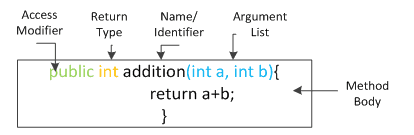
SYNTAX:
datatype methodname()
{
*****method body *****
}
TYPES OF METHODS:
- Parameterized method – “which have datatype”
- Non- parameterized method – “which don’t have datatype”
- Method with return type
- Method without return type
Non- parameterized method:
The non – parametric methods do not have any parameter-list.
The programmer can simply call the function without sending any values to the function.
EXAMPLE:
//Non-parametrized method with return type
int addition()
{
int a=5;
int b=10;
int c=a+b;
return c;
}
Parametrized method:
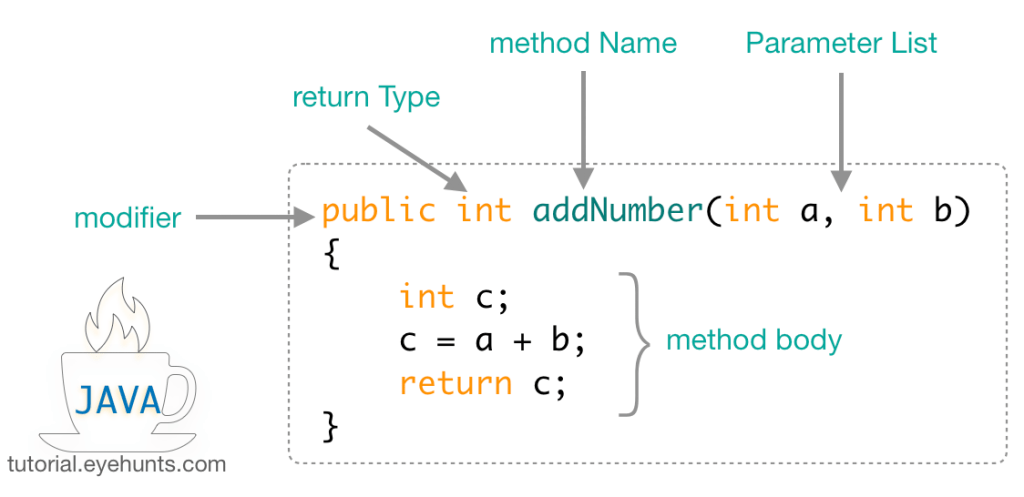
These methods contain a parameter list or an argument list which receives a value from the calling method.
Their type is specified in the parameter and is separated with commas.
EXAMPLE:
//Parametrized method with return type
int addition(int a, int b) *****a and b are parameters*****
{
int c=a+b;
return c;
}
Method with return type:
Every method is declared with a return type such as int, float, double, string, etc.
These return types required a return statement at the end of the method.
A return keyword is used for returning the resulted value.
Example:
//Non-parametrized method with return type
double simpleInterest()
{
double p=1000.0;
double n=2.5;
double r=7.0;
double si=(p*n*r)/100
System.out.println(si); ***** console (DISPLAY SCREEN) *****
return si; ***** compiler (STORAGE/ MEMORY) *****
}
WHY RETURN: Able to store a o/p value, that can be reused many times.
Method without returntype: (NO STORAGE)
This method is a void method, which does not return any value.
If you are still returning a value from a method with a void return type, a compile error will be thrown.
An empty return statement is acceptable within a method with a void return type because it doesn’t return any value.
EXAMPLE 1:
//Non-Parametrized Method without return type
void display()
{
println(“Hello World “)
}
EXAMPLE 2:
//Parametrized Method without return type
void add(int a, int b)
{
int c=a+b;
println(c);
}
Method calling a method:
Call the method. To call a method, we just need to type the method name followed by open and closed parentheses on the line you want to execute the method.
Make sure we only call a method within a class that has access to it.
TWO TYPES OF METHOD: 1. calling another method , 2. calling itself(RECURSION)

EXAMPLE:
double sum(double a, double b, double c)
//method execution
{
double d= a+b+c;
return d; ***** method return to sum() *****
}
double average()
{
double x= sum(7.0, 3.0, 5.0)/3.0; ***** method call *****
println(x);
return x;
}
(OR)
double avg(double a, double b, double c)
{
double d= (a+b+c)/3.0;
println(d);
return d;
}
O/P: 5.0
CLASS:
First and foremost topic in OOPS.
JAVA program should have atleast one class(ie., JAVA program doesn’t exists without class).
A class can have any number of methods, all methods should come inside a class.
“class” is a keyword to create class in java.
Class is template/blueprint/structure of a program.
Class can have any number of objects.
A java file can have any number of classes but out of which only one can be main class.
Class is dummy until we create object.
100% implementation (0% abstraction).
WHEN WE CALL A CLASS AS MAIN CLASS?
- Main class should have “public” access modifiers
2. Main class name = java file name.( entry point of java execution)
3. Main class should have main method.
STYLE: class name – first letter should be in caps.

SYNTAX:
class Classname
{
}
EXAMPLE:
//Arithmetic program
public class Arithmetic *****USER DEFINED CLASS *****
{ ***** CLASS OPEN *****
double x= 7.5;
double y= 2.5;
double z; **Instance or object variable common to all methods**
double add()
{
z=x+y;
println(z);
return z;
}
double sub()
{
z=x-y;
println(z);
return z;
}
main()
{
// MAIN EXECUTION AREA ***** MAIN METHOD(entry point JVM) *****
}
} ***** CLASS CLOSE *****
NOTE: Method gives first priority to local variables, if we have local and instance variable with same name.
VARIABLES:
Variables are used to store data in a programming language, that data keeps varying hence called as variables.
Input and output of a program are usually stored as variables.
- The value stored in a variable can be changed during program execution.
- A variable is only a name given to a memory location. All the operations done on the variable affect that memory location.
- In Java, all variables must be declared before use.
SYNTAX:
datatype identifiers = literals;
eg: int num = 2;
TYPES OF VARIABLES:

OBJECT:
Object is a fundamental topic in OOPS.
“new” is a keyword to create object.
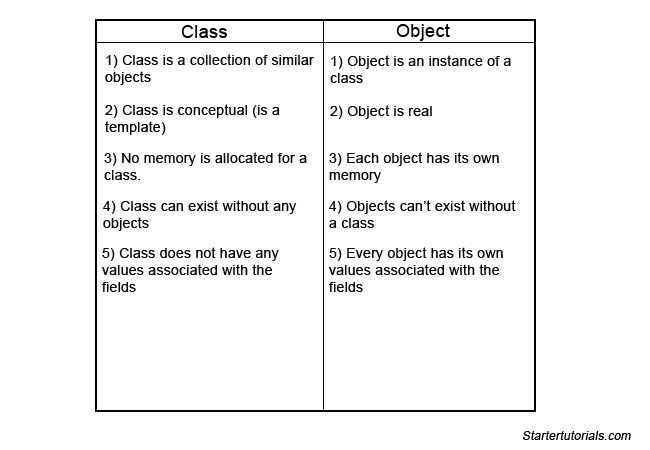
Object is an instance of a class.
Class can have any number of objects.
Object takes the responsibility of method execution including it’s order(ie., priority)- Hence java is known as OOPS Language.
A class should have atleast one object.
SYNTAX:
class_name object_name = new Class_name();
eg: Animal obj = new Animal();
DIFFERNCE BETWEEN CLASS AND OBJECT:
EXAMPLE:
//Arithmetic program
public class Arithmetic *****USER DEFINED CLASS *****
{ ***** CLASS OPEN *****
double x= 7.5;
double y= 2.5;
double z; **Instance or object variable common to all methods**
double add()
{
z=x+y;
println(z);
return z;
}
double sub()
{
z=x-y;
println(z);
return z;
}
main()
{
//OBJECT CREATION ***** METHOD CALL USING OBJECT *****
Arithmetic obj = new Arithmetic();
obj.add();
obj.sub();
}
} ***** CLASS CLOSE *****
 Site Title